01 / 16
← → to navigate
Foundry for Teams · Dogfood
CONCEPT → PUBLISHED, DRIVEN ENTIRELY THROUGH FOUNDRY FOR TEAMS

From a sentence
to a live blog.

A cat lover with a kitten named Felix wants a cute, informative three-page blog. We build it end-to-end using every part of FfT — and ferret out real bugs along the way, toward a solid v1.0 for non-technical users like Jack.

Felix, the kitten — the seed of the whole journey
01 · Why this journey

Two goals, one real
build from start to finish.

We didn't want a demo that only works in the happy path. We wanted to walk the whole product the way a genuine first-time creator would — and break things on purpose so we could fix them before Jack ever touches it.

1

Prove it works, for real

Take a plain-English idea and carry it all the way to a published, working website — using every part of Foundry for Teams, not a slideshow of screenshots.

2

Find and fix the bugs

Rigorously exercise Mimic, the PRD tools, the build lane, Edit, the Debug Hub and Publish — and log every real defect in plain English, fixed durably.

One neat detail: Playwright is both how we drive every step and how we capture it. Every screenshot in this deck is a real, external picture of the product being used. nothing staged

P1 · Articulate the concept

Describe the blog
in plain words.

A joyful, curious kitten in his happy home. Three tidy pages — Home, Felix's World, and Kitten Care — warm and genuinely useful, not a giant site.

  • Slick UI to show off: a dropdown/accordion, hover-reveal captions, an on-demand popup, an image slideshow.
  • Two real forms — "leave Felix a comment" and a kitten-tips signup — that later give the Debug Hub something real to test.
  • The rule: design ideas come from researching real sites, not from memory.
The persona

"A visitor lands, goes 'aww,' learns something useful about kitten care, plays with the fun bits, and maybe leaves Felix a comment — all in three tidy pages."

That's success, in the creator's own words.

P2 · Create the FfT project

Spin up felix-blog.

Like opening a fresh, empty folder in a website builder and naming it "Felix Blog." Right now it's just a blank starter page — but because it's a named project, everything we do next stays attached to it, and we can close it and come back anytime.

That "close it and come back" is exactly what a real user needs — and it's what we prove stays intact all the way through P6.

Created ✓

POST /foundry/new-project → HTTP 200, slug:"felix-blog". On disk: the starter blank site — nav + hero + intro.

Kept linked throughout

This one project threads through research cards, the PRD, the build, the edits — one home for the whole journey.

P3 · Research real sites with Mimic

Borrow good ideas —
don't invent from memory.

Before capturing anything, we decided what to learn and which real sites to study, so the research was purposeful. Then we used every Mimic function on each one.

Layout

How a simple, polished blog arranges a hero, sections, and cards.

Palette

Warm + cute, not childish — chosen from what we saw, not guessed.

Slick behaviors

Dropdown, hover-reveal, popup, slideshow, gradient hero.

Organization

A skimmable "care tips" structure worth adapting.

Study sites: icatcare.org (calm care layout), thesprucepets.com (card grid), stripe.com (color + slick interactions). Each becomes a saved, annotated card associated to felix-blog. the rule holds

P3 · Studying icatcare.org

Load a real site,
then annotate and capture.

icatcare.org rendered live in the in-app viewer — full nav dropdowns, hero, kitten photo. We turned on Annotate to draw on it, then Region to capture just the part worth borrowing, and saved it as a card.

What we learned: a calm palette (soft neutrals + one warm accent) reads "caring," not childish; care topics chunk into clear sections; a big friendly hero sets the tone. All carried into the PRD.

Found Bug #1 here — Annotate and Region could both be "on" at once. Fixed, verified, resumed.
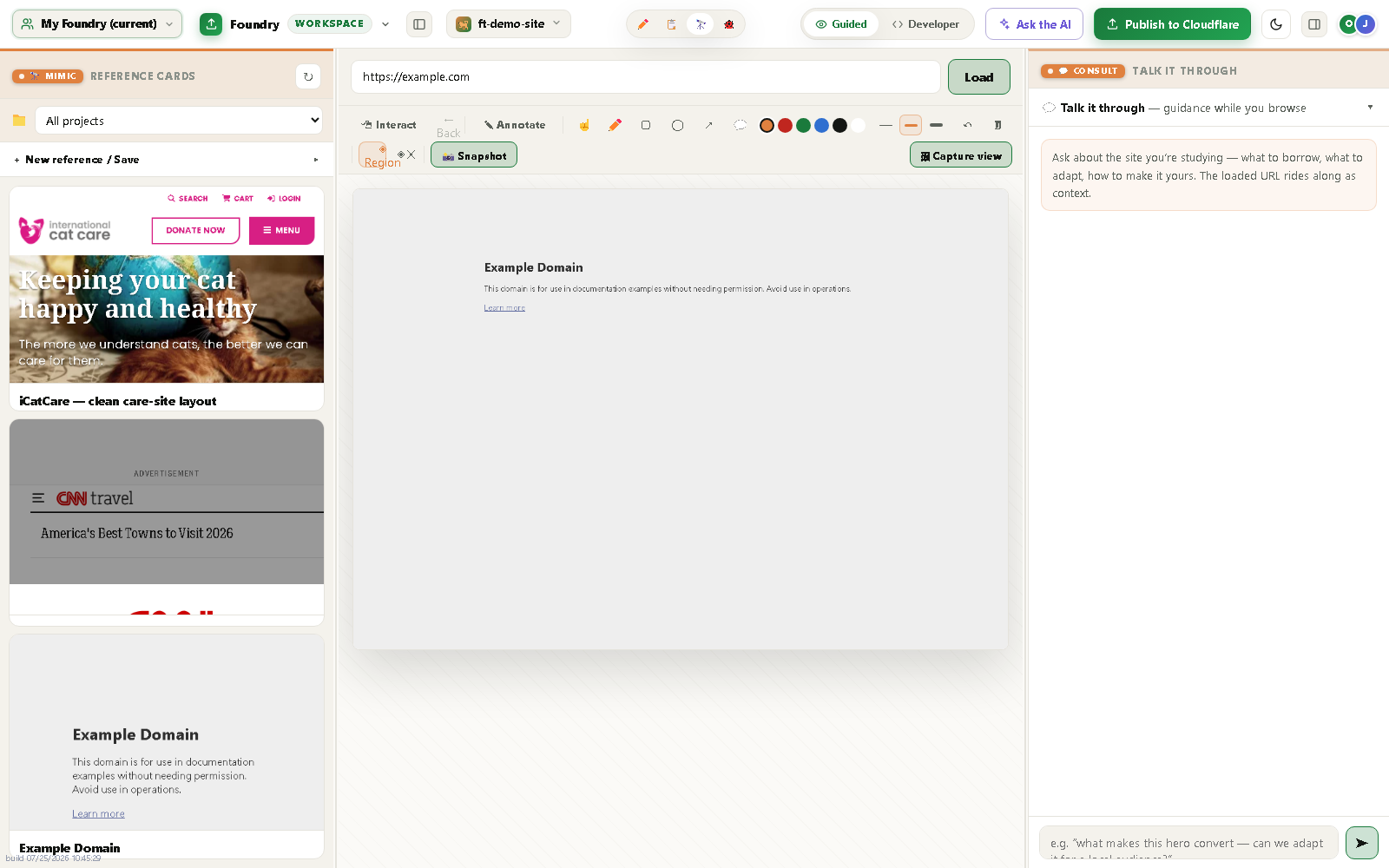
icatcare.org rendered in the in-app Mimic viewer with the region-select box
icatcare.org live in the embedded Mimic viewer — region select drawn.
P3 · When a site blocks the viewer

Exactly why we built
the Chrome plugin.

Some big sites can tell when a page is loaded by an automated behind-the-scenes browser, and show a "you look like a robot" page instead. thesprucepets.com did exactly that. Our tools worked perfectly — region, annotate, capture, save all succeeded; the site simply refused to render.

That's the website's choice, not a bug in the tool — and it's the exact case the Chrome plugin exists for: it captures in your own normal browser, where you're just a regular visitor. Stubborn sites come through fine.
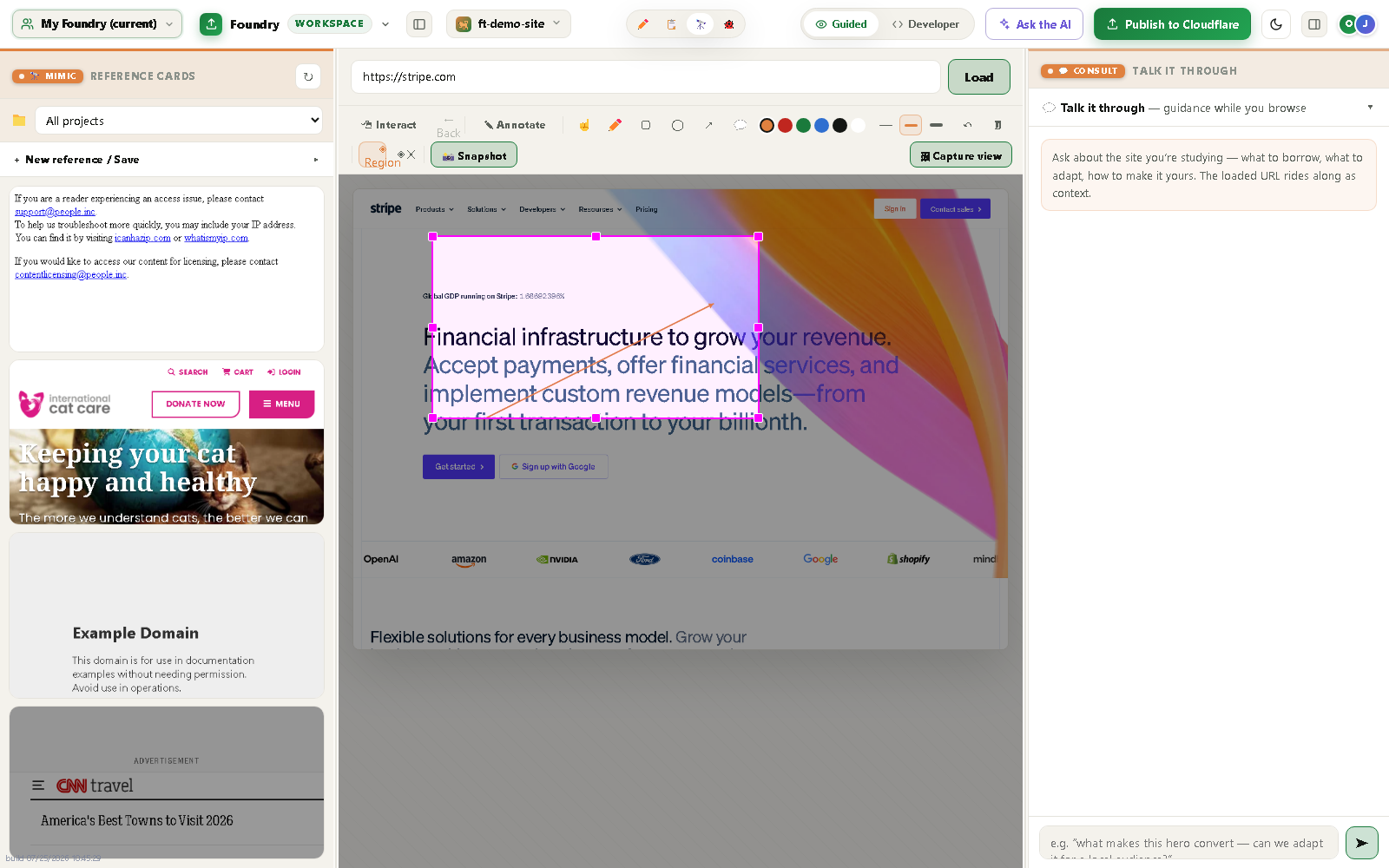
Region-capture box and arrow drawn correctly even on a difficult site
The magenta capture-box + arrow drawn correctly — the tool itself is solid (Note #1).
P3 · Consult, synthesis + the portable plugin

Blend the research —
and prove the plugin.

We asked the Consult thread a real design question, reviewed the saved cards in the detail overlay, exercised card- and attachment-level sharing, and demoed the Chrome plugin capturing a live page — the attachment landed in the same library, on a felix-blog card.

Distilled decisions → warm calm base + one friendly accent + a subtle Stripe-style gradient hero; a big Felix photo with a short promise; nav dropdowns; content chunked into skimmable sections; the slick behaviors + two forms.

P3 scorecard: embedded viewer · region · annotate · save · associate · library · Consult · detail overlay · sharing · plugin — all ✓. felix-blog now holds 3 richly-annotated cards.
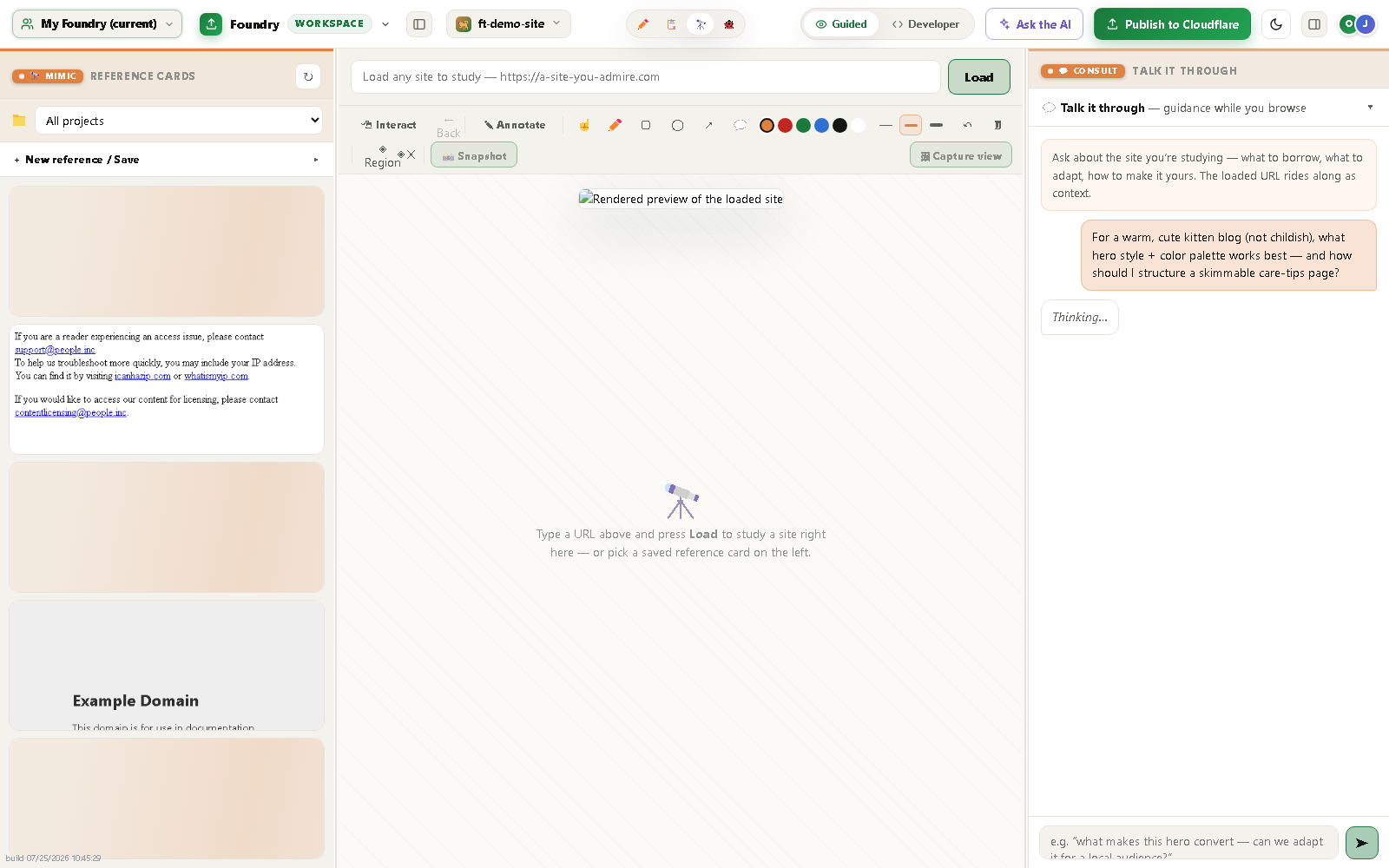
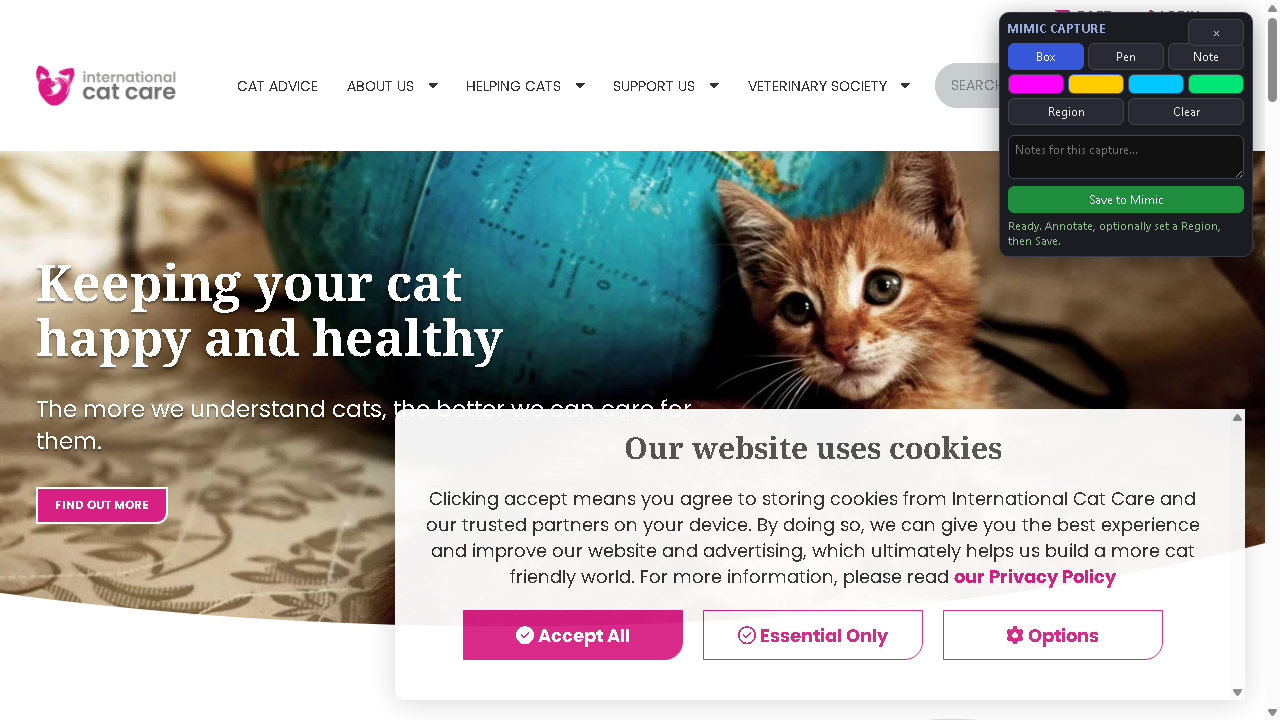
A design question typed into the Mimic Consult thread The Chrome plugin toolbar injected on the live icatcare.org page
Consult thread (top) · the Chrome plugin toolbar on a live page (bottom).
P4 · Craft the PRD with the intent tools

From intent to a
buildable spec.

The PRD page is a living-document builder: on the left, the spec (prd.md); on the right, a consult where you "feed the PRD anything — a paragraph, a screenshot, a stray idea — and it gets woven in." We fed the concept + research and hit Submit.

The consult lane wove a real Product Requirements Document for the three-page blog — nav + jump links, the slick behaviors, both forms, the warm calm palette — across ten sections, from our intent, not our memory.

Bug #2 lived here: the weave talked but wrote nothing. Traced to the save side never being wired for PRD jobs — fixed via a --kind prd write path. 6,381 bytes of real markdown now land on disk.
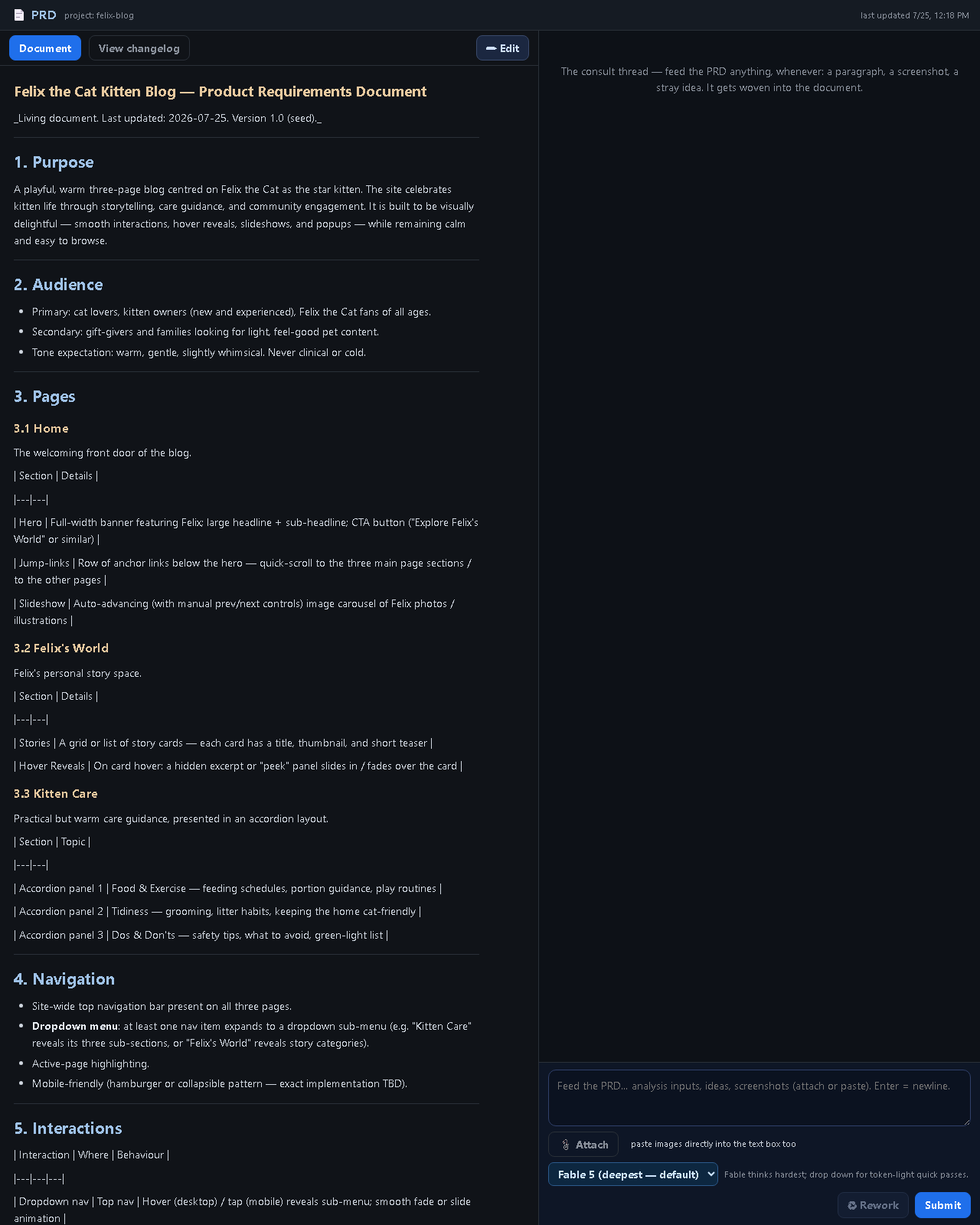
The woven Felix PRD shown in the PRD pane
The woven Felix PRD — "Felix the Cat Kitten Blog — PRD, v1.0," 20 headings.
P5 · The lane builds the site FROM the PRD

The core promise:
a real, working site.

Hit "Initiate" and a separate builder reads the PRD and produces a genuine three-page site — not from our memory. Describe intent → get a spec → get a working website. This is what FfT is for.
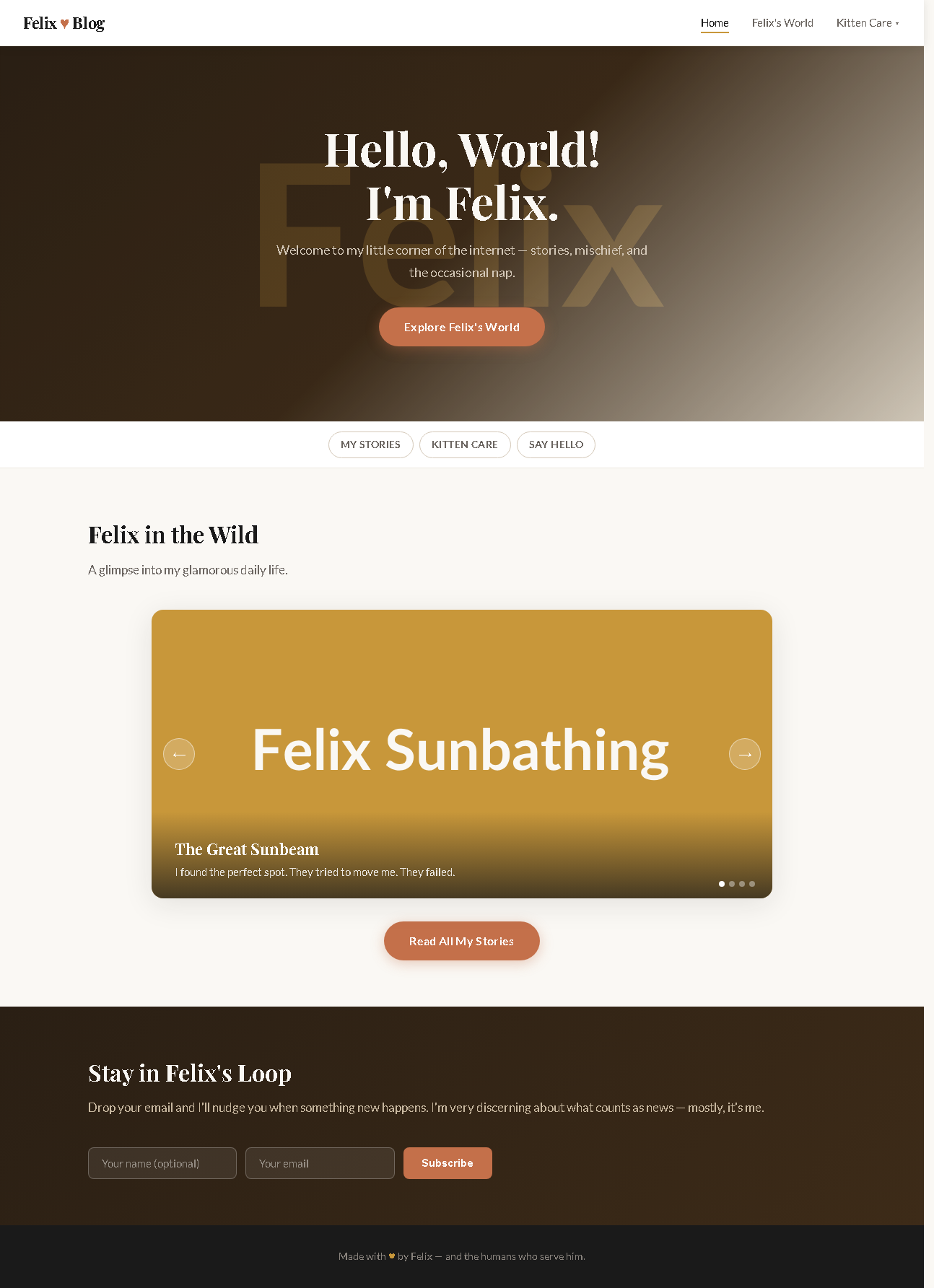
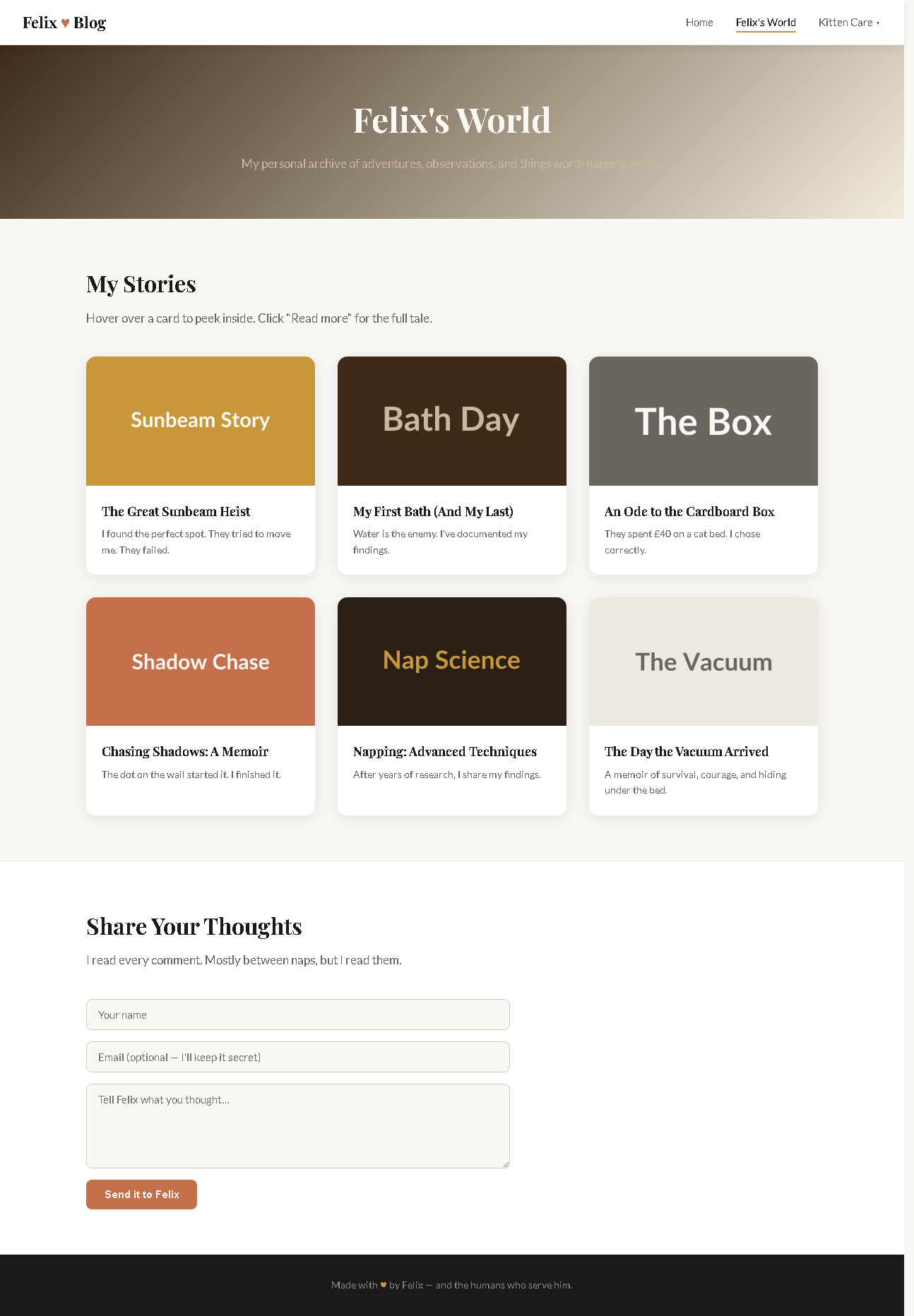
Felix blog Home page built from the PRD
Home · 18.5 KB — gradient hero, nav dropdown, jump pills, carousel, signup
Felix's World page with story cards
Felix's World · 24.1 KB — 6 story cards + comment form
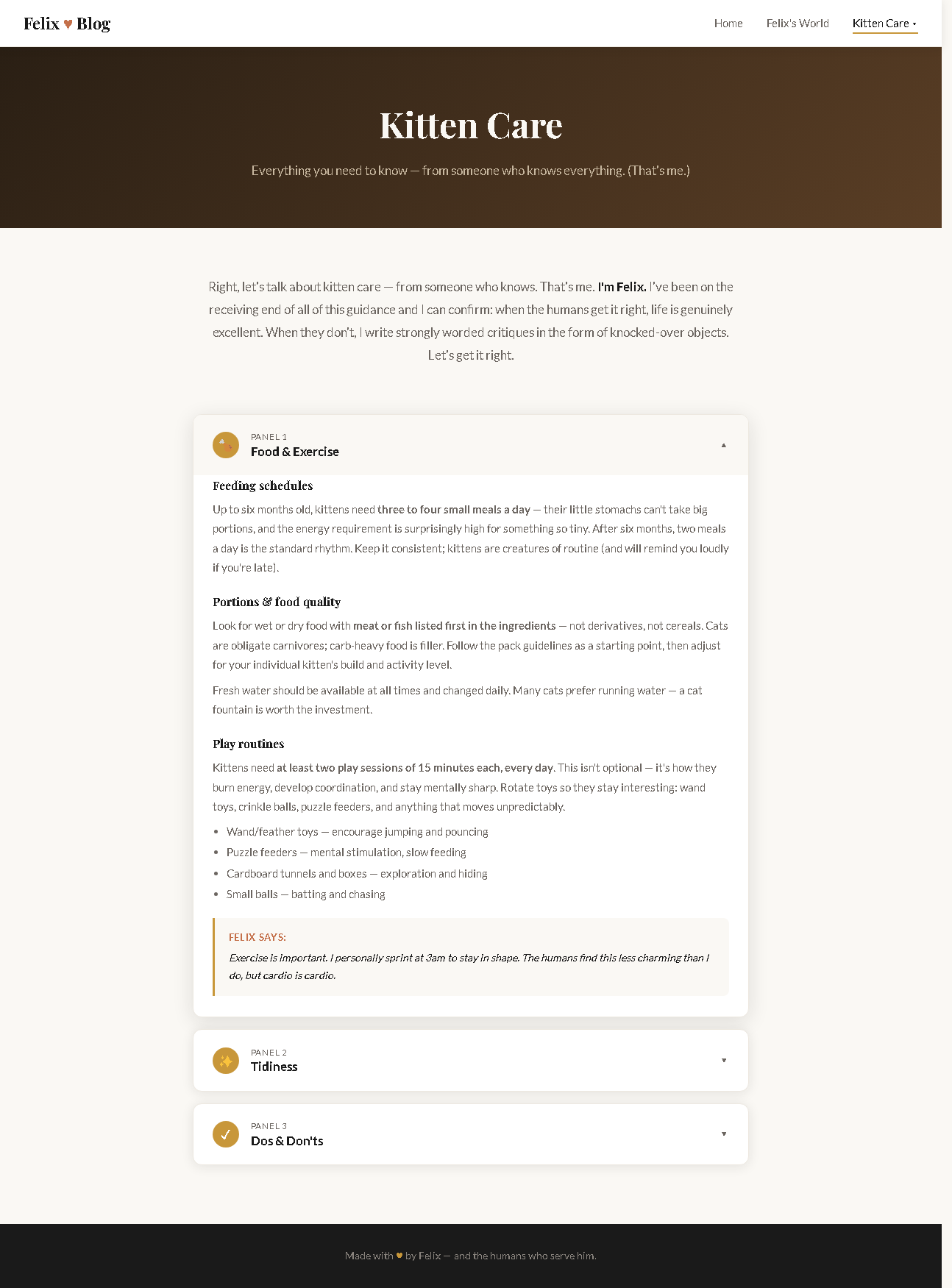
Kitten Care page with accordion
Kitten Care · 20.9 KB — skimmable care accordion

Design matches the Mimic research — warm palette + Stripe-style gradient hero + care-site sectioning. Metering-clean: built by the live lane worker, no headless model call. Finding (Note #2): the worker built it solo instead of spawning sub-agents as instructed — fine here, worth watching for bigger sites.

P6 · Revise + a second Mimic pass

The improvement loop —
links stay intact.

How Jack or Omar would keep improving a site after the first build. We sent edits through Edit-Consult (a friendly hero subtitle, a card-hover lift) — and the standing lane really wrote them to the site. Then a second Mimic pass: study another real site, save a card, link it to the project, feed the idea back in.

  • Edits landed — the hero subtitle now sits in index.html; the hover-lift in two pages.
  • Links intact — switch away and back, Mimic still filters to 4 felix cards; the PRD still resolves.
  • One early request honestly refused (the text wasn't on the page yet) — no fabrication.

Bug #3: saved cards didn't auto-link to the project (sealed script boxes couldn't share the active slug). Fixed by publishing the slug where both boxes can read it.
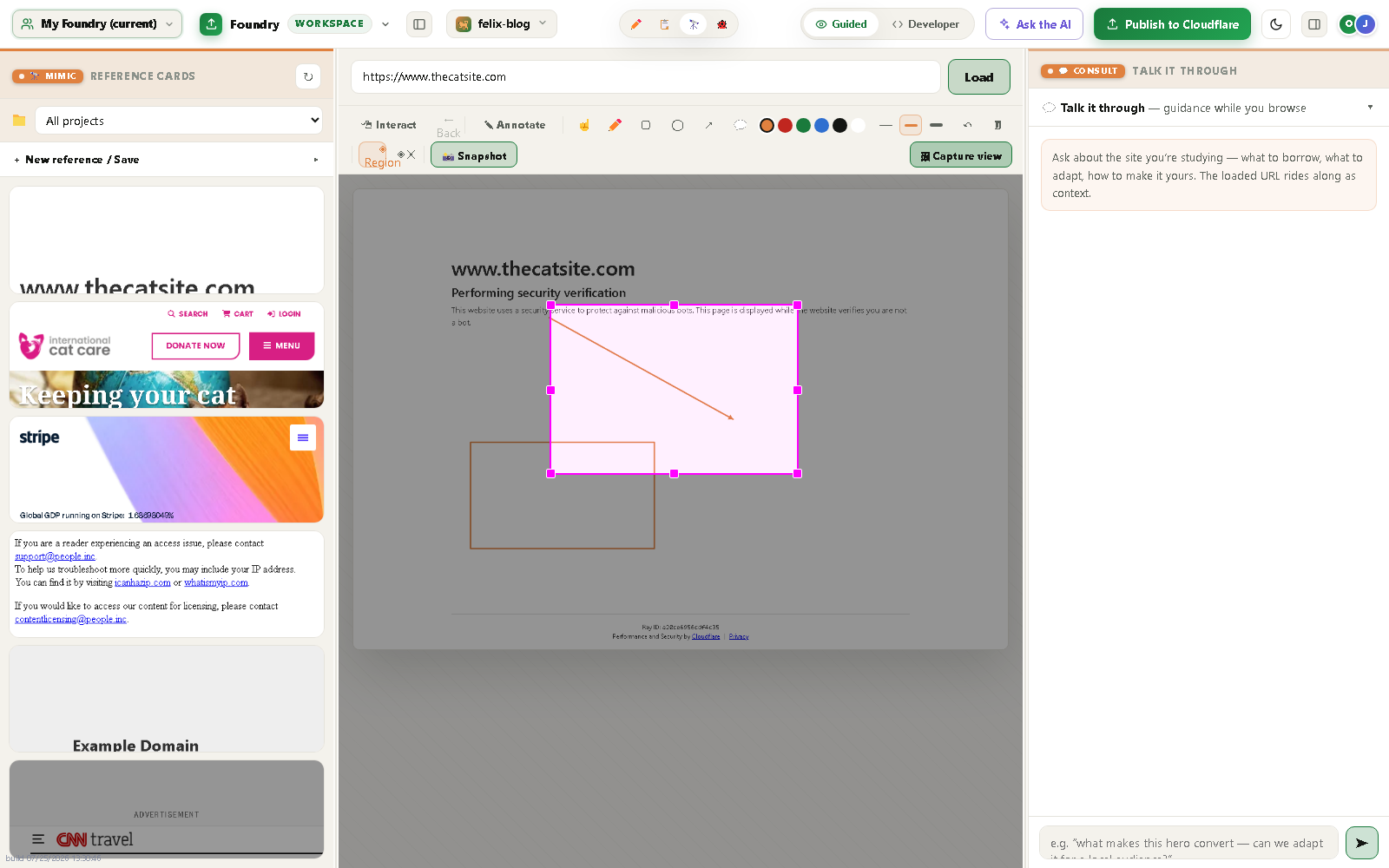
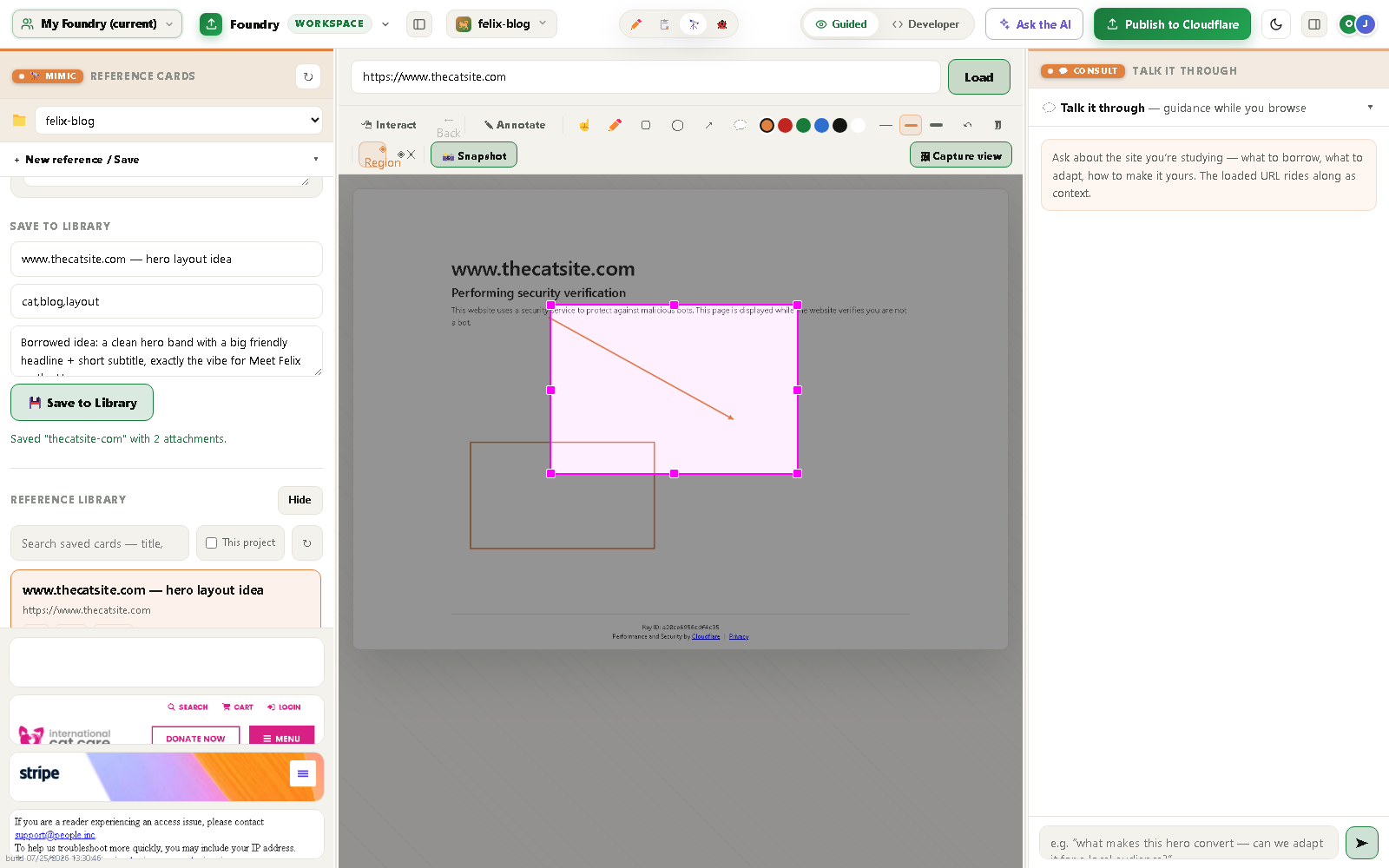
Second Mimic pass — region capture on thecatsite.com Project links intact — Mimic filtered to 4 felix-blog cards
2nd Mimic pass region-capture (top) · project links intact, 4 cards (bottom).
P7 · Debug Hub — test the site

Crawl every link,
poke every form.

The Debug Hub is a three-pane deck: a Test board, a Talk-to-Jenny chat, and a live View. We put Felix's site through real QA — every navigation link, and both forms with empty and valid input — then surfaced the results back on the board.

20/20nav links pass
✓✓both forms behave
0invented bugs

Honest finding (Note #3): the hub shows results but doesn't run the tests itself. A skilled session drove the crawl. v1.0 next step: a one-click "Test this site" button so Jack has a button to press.
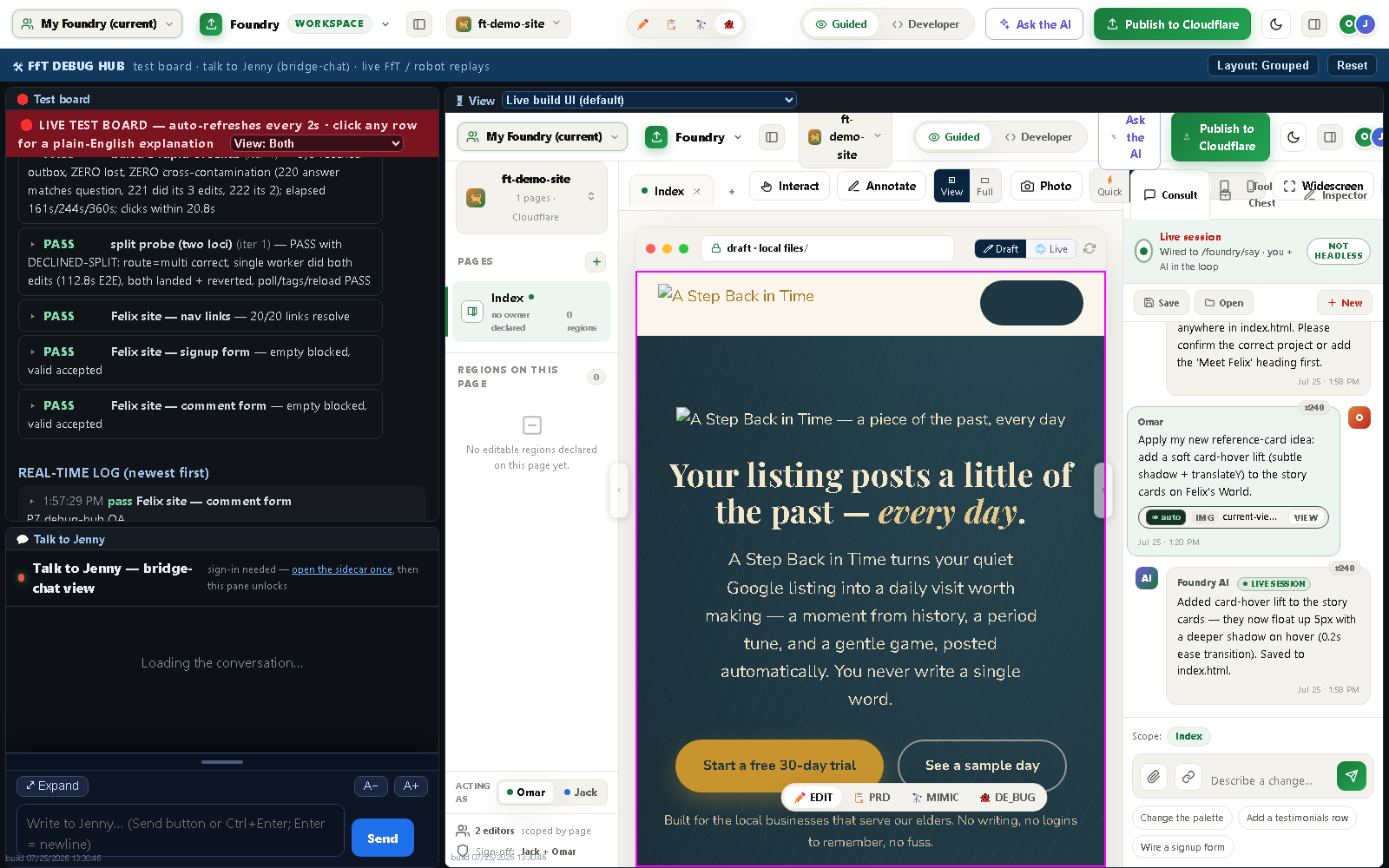
The Debug Hub Test board showing three green Felix rows
The Test board inside the hub — three green Felix rows. The designed loop, closed.
P8 · Publish live

The blog goes public.

One call publishes Felix's blog to the real internet via Cloudflare Pages — no manual config, no wrangler wrangling. POST /foundry/publish → "✨ Success! Uploaded 3 files · Deployment complete."

Live now

fft-felix-blog.pages.dev

All three pages resolve HTTP 200 — Home, Felix's World, Kitten Care. The P6 edits (hero subtitle + card-hover lift) rode all the way through to production.

Metering-clean: pure Node + the wrangler CLI, no model call. The full intent → PRD → build → edit → publish chain, proven end to end.
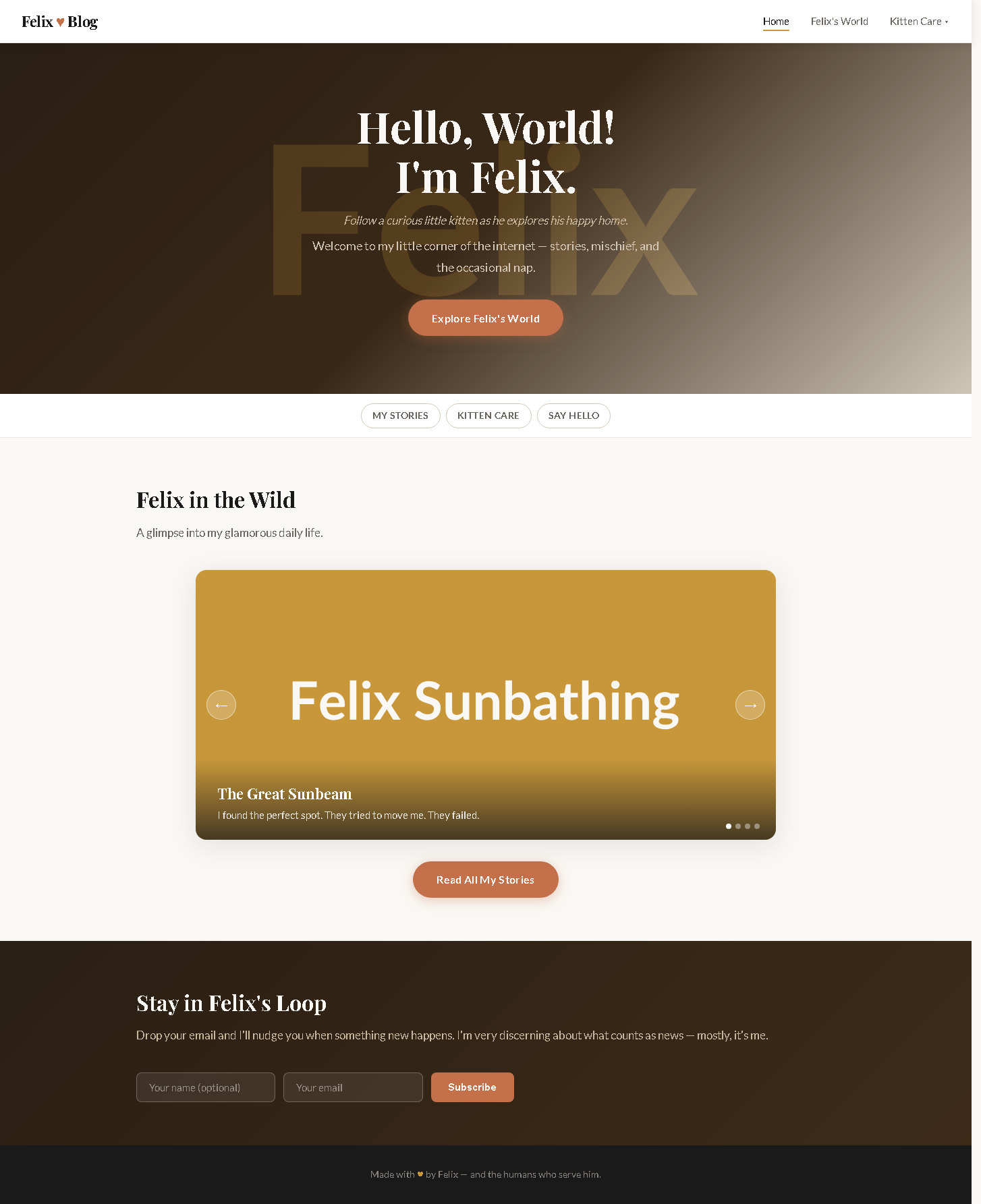
The live Felix blog home page served from the public URL
The live blog: gradient hero "Hello, World! I'm Felix," carousel, signup — served from the public URL.
The payoff · What we found + fixed

The dogfood's real
value: the bugs.

#1

Two modes on at once

Annotate and Region could both light up, so drawing broke region-capture. Made them mutually exclusive — a proper "one at a time" switch.

#2

PRD weave wrote nothing

The lane said "PRD created" but saved no file. The save side was never wired for PRD jobs. Fixed via a confined --kind prd write path — 6,381 bytes now land.

#3

Cards didn't link

Saving a card with a project open didn't associate it — sealed script boxes couldn't share the slug. Fixed by publishing it where both can read.

Note #1 · Bot-blocks

Some sites block the server renderer → the Chrome plugin is the answer. Tool itself is solid.

Note #2 · Orchestration

The lane built solo instead of spawning sub-agents. Fine here; worth honoring for bigger sites.

Note #3 · Observation deck

The Debug Hub shows results but can't yet run tests itself. A one-click crawl is the v1.0 gap.

Three real bugs, each fixed durably and logged in plain English, plus three honest findings named — not hidden. That's the whole point of dogfooding before Jack. honesty is the deliverable

The thesis

A sentence became a
published blog.

Foundry for Teams took a first-time creator from a single plain-English idea — "a cute blog about my kitten Felix" — all the way to a real, live, three-page website anyone can visit. Every part of the product carried its weight: Mimic research, the PRD tools, the build lane, Edit, the Debug Hub, and Publish.

And the journey hardened the product: three bugs found and fixed, three honest gaps named. FfT is measurably closer to a v1.0 ready for Jack and for commercialization.

P0–P8 ✓whole journey complete
3 fixedreal bugs, durably
Livefft-felix-blog.pages.dev

The chain held end to end: intent → PRD → build → edit → debug → publish. Not a demo — a real site, and a stronger product for having built it. ready for Jack

Foundry for Teams · Dogfood

Meet Felix — live.

A curious little kitten, a happy home, and a product that took him from a sentence to the open internet.

fft-felix-blog.pages.dev